Invoices CDS
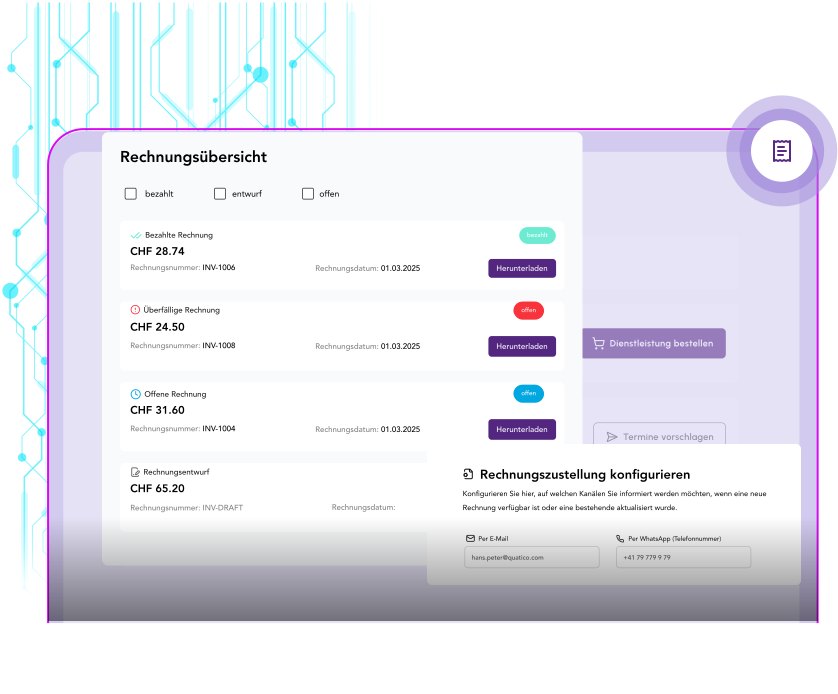
Transparent invoice management
The Invoices module gives customers a clear, simple view of their invoices straight from your ERP system (HubSpot, Bexio, SAP and others). They can view invoices, filter them and download them as PDFs.
Key features
| Funktion | Beschreibung | Nutzen |
|---|---|---|
🔗ERP system integration | Direct connection to common ERP systems such as HubSpot, Bexio, SAP and others. | Invoice data synchronises in real time — no manual upkeep. |
📊Filterable invoice overview | A clear list of every invoice, filterable and sortable by date, status and amount. | Customers find the invoice they are looking for without contacting support. |
🏷️Status tracking | The current invoice status at a glance: open, paid, overdue, cancelled. | Transparency about payment status prevents misunderstandings and follow-up questions. |
📅Due date overview | Invoice date, due date and payment terms, clearly displayed. | Customers get timely reminders and can plan their payments better. |
📄PDF download | Download the original invoice document as a PDF, with every detail intact. | Customers can reach their invoices any time, for accounting and archiving. |
💳Payment status display | Detailed information on payments received, outstanding amounts and partial payments. | Full transparency across every financial transaction. |
ERP system integration
Beschreibung
Direct connection to common ERP systems such as HubSpot, Bexio, SAP and others.
Nutzen
Invoice data synchronises in real time — no manual upkeep.
Filterable invoice overview
Beschreibung
A clear list of every invoice, filterable and sortable by date, status and amount.
Nutzen
Customers find the invoice they are looking for without contacting support.
Status tracking
Beschreibung
The current invoice status at a glance: open, paid, overdue, cancelled.
Nutzen
Transparency about payment status prevents misunderstandings and follow-up questions.
Due date overview
Beschreibung
Invoice date, due date and payment terms, clearly displayed.
Nutzen
Customers get timely reminders and can plan their payments better.
PDF download
Beschreibung
Download the original invoice document as a PDF, with every detail intact.
Nutzen
Customers can reach their invoices any time, for accounting and archiving.
Payment status display
Beschreibung
Detailed information on payments received, outstanding amounts and partial payments.
Nutzen
Full transparency across every financial transaction.
Practical examples
Self-service invoice portal
Customers get a filterable overview of their invoices with status, due date and amount. They can open an invoice in detail and download it as a PDF. That cuts support requests, because customers reach every piece of invoice information on their own.
Automatic payment reminders
The system highlights overdue invoices and can send reminders automatically. Customers see at a glance which invoices are still open, and can go straight to the details or arrange payment.

Ready for the next step?
Michael — Use our enterprise portal software to build innovative digital products. Michael is happy to advise you.